2 Nisan 2020 Perşembe

ONLINE (DISTANCE) EDUCATION


Hello everyone after a long break.

I hope everyone is fine, safe and at home.

COVID-19 - Yeni Koronavirüs Hastalığı              I think 2020 started the year a little bit different, didn’t it? At least for my country, 2020 is different year. One of the big situations is Corona which also called Covid-19. I think, we can’t say why did Corona appear. Many reasons may happen, but this illness cause to stop almost every institution such as factories, shopping malls, universities, schools etc. Doctors have the most important task here. I hope nothing happens to any healthcare professional. 


Will Online Learning Replace the Classroom? | Online Digital ...             Besides all of things, education was stopped in this term. We don’t know how long it will take but universities ended their spring terms. Primary schools were announced to be closed for at least one more month. This mean is no more face to face education from now on. This is new thing for world, I guess. Of course, online education exists for years but taking courses online for so long is new thing, at least for my country. As a student, I started to take online education too. My first opinion was not bad because it was new thing for me too. It was exciting for me and my classmate. Online education has so many advantages on the other hand it has disadvantages too.


ADVANTAGES:
  • The learner and teacher may geographically be located at different places. The learner is vitally in touch with the teacher.
  • It has flexible environment and schedule. The learners are in their comfort zone.
  • Online education requires more self-motivation and time-management skills. Online classes not only include math, English etc. but also requires self-motivation
  • Online education’s costs are lower than face to face education. Most of education in online are free.
  • There are many various online classes you can join whichever you want etc...

DISADVANTAGES:
  • Not all students have their own discipline. They can open their account they may not join their classes efficiently.
  • Building relationship with students will require more effort than face to face education. Some students feel more comfortable with their teachers. Because interaction between students and learners in face to face education is more realistic.
  • Having too many distracting items is another problem. They have other devices phone, music players etc. They may go kitchen, bathroom wherever they want. Eating something, listening to music, chatting with friends are distracting things. Multitasking reduces the impact of the focused job.
  • It can also cause some health problems such as poor vision, back pain, strain injures etc.

If we want to summarize the disadvantages and advantages of online education, we can say these.

Right now, our question may be; what teachers should do for effective online education? This week I am going to start giving online education too. What will I do or do you have a any suggestions for me?

You can check my previous posts about technological education programs. Next post, we may talk about that.

Thank you for your reading.

Until we meet, 
PLEASE STAY AT HOME FOR YOURSELF, YOUR LOVED AND OTHER PEOPLE.  #STAYHOME  #EVDEKAL 🏠🏡

See you in next post 😊💛👋

20 Ocak 2020 Pazartesi

MACHINIMA


After long break, I'm back with very useful and fun content.

A long time, I will take a break from introducing application or program. Today I want to explain MACHINIMA to you.

                     What is that mean Machinima? 
     I guess I can explain briefly. Everybody likes computer games, right? Especially this era, everybody plays digital games from old to young. Of course, I like playing computer games, too. After challenging processes such as studying, teaching, it helps my head to relax. So, in terms of education, how will this information work for us?

     We prepare a project thanks to our teacher Tuncer Can. You can add whatever you want to say in videos background. You can use a lot of video games for that such as; Second Life, Sims City, GTA 5 etc. Just find a place and create your avatar, then take screen video. Lastly, add your own or somebody’s voice back.

    You can teach lots of subjects thanks to this project.  It is both interesting and instructive for children. For example, we created a video with using Second Life and our goal was teaching simple past tense. We spoke about our last holiday.


Also, you can find lots of video about machinima on youtube. 

See you in the next post.🥰

5 Ocak 2020 Pazar

GET IN TOUCH WITH FLIPGRID

Hello friends, 

Today's topic is FLIPGRID.


           You can set up a class online and browse videos as you like. you can then reply to these videos by shooting videos. A useful app that can improve students' speaking skills through online. it is enough for the teacher to establish a class and share the class code with the students. students can upload videos to this class as they wish. very useful application for cooperation and communication. The application is free up to 90 seconds, you need to pay a certain fee for later but in general this time is quite enough for students.

          I've tried this application with my own class before and very nice videos were produced. The app can also help you feel more comfortable in the classroom and strengthen communication between students.

         In addition, this application can be fun for children. They can add different emojis or wear masks on their faces.

        Do you want to try this application without losing any time?


This the the link of Flipgrid : https://info.flipgrid.com/


4 Ocak 2020 Cumartesi

THE EASIEST WAY TO PREPARE QUESTIONS: HOT POTATOES

HELLO FRIENDS,


          Teachers should always be prepared for the lesson. In this post I will mention about an easy way to prepare worksheet or quizzes for teachers: HOT POTATOES


          Sometimes I find it hard to prepare a paper or an exam for my classes. As a teacher and so intertwined with technology, I discovered a program. The name of the program is Hot Potatoes. 

          Briefly, it is a program where you can prepare classic, multiple choice tests and transfer them on the web. After preparing an application that does not require internet connection. HP software was developed by the University of Victoria. It is a free program. Moreover, you do not need to know extra computer skills for this program. It is quite simple to use.


Some of features:

It consists of 6 parts:

  •  Gap Filling (Jcloze)
  •  Multiple Choice (Jquiz)
  •  Matching Exercise (Jmatch)
  •  Creating Meaningful Sentences from Mixed Sentences (Jmix)
  •  Puzzle Preparation (JCross)
  •  Creating Unit Logic (Jmasher)


How we can use this program?

  • First of all you should download the program( you can download from here: https://hotpot.uvic.ca/ ) and setup is quite simple but it can vary according to the computer model.
  • Then you should assign a username for yourself 
  • Finally you can choose which kind of questions you want to prepare

         Because of New Year's Eve, I prepared a song activity for my primary school students.Also, I prepared a vocabulary test for my secondary school students. But I believe I will use this program even more. You can  add clues and shape them as you like while preparing your questions.You can do a lot of  worksheets that students can use not only in the classroom, but also after class.

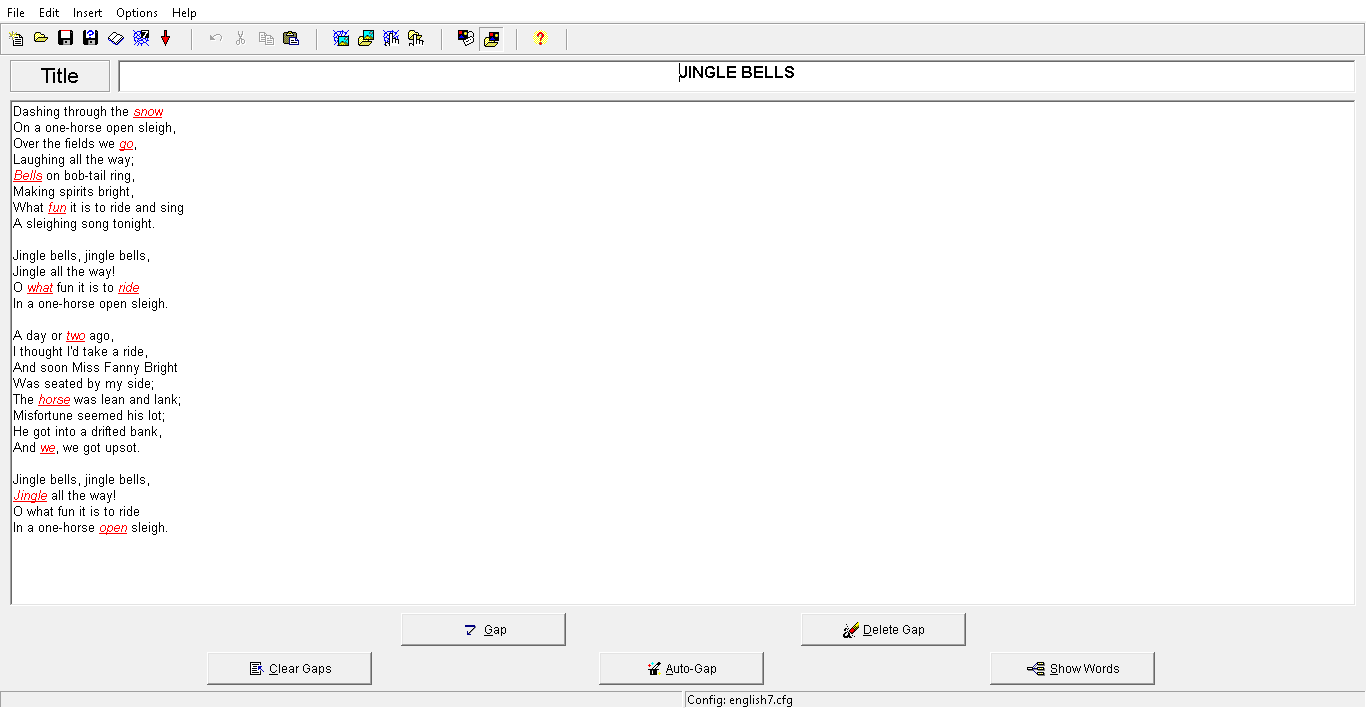
Here, there are some examples which I made using this application:
file:///C:/Users/Sude/Desktop/vocabulary%20test1.htm
file:///C:/Users/Sude/Desktop/JINGLE%20BELLS%20LYCRIS.htm


SEE YOU🤹‍♀️


CREATE ANIMATION WITH: POWTOON


Hello Everyone,


       This week I want to mention you about the application: POWTOON


        Powtoon is one of the most frequently used tools recently. Powtoon is a tool that allows you to create an animation using speech bubbles, shapes, images, characters, and more. It is an application with both paid and free sections, but I think the free section is quite enough. I had a lot of fun while using it and it is an extremely easy tool to use.


        Like other programs, it's a good way to explain our lessons differently. A small detail, you can look cool if you use this program in presentations as a student 😊 😊

How to use Powtoon?

  • Firstly, you need to open an account
  • Then, you should select the sections you are interested in. You can already find a lot of ready-made templates, you can make edits on it, you can choose your characters.
  • A tool that can be used in many fields such as advertising, promotion, not just education.

         I've prepared a video about Powtoon. Starting a class with this video can be different and interesting for students.


         Like any other application, how we use it is up to the imagination of the teachers. Using our technology efficiently is very important both for us and for our learning. Using our technology efficiently is very important for us and for our students. Using this app, you can introduce animals in a foreign language if you like or you can teach school stuff or a grammar
 topic. Whatever you want you can teach.


This is the link of Powtoon:  https://www.powtoon.com/home/?

GOODBY 🤸‍♀️


3 Ocak 2020 Cuma

LOOK AT MY BOARD!!


Hello Again👋,

           I've talked about a lot of applications so far. I wrote about how to make them more useful and effective in language classes. The name of our application is PADLET

           As I mentioned before, these applications are not specifically designed for language teaching. Practices that may be useful in language learning through the use of teachers. Applications that may be useful in language learning by teachers' use. In this way, children will learn willingly not forced.

           Today I'm going to tell you about the Padlet. Its main purpose is not language learning, of course. You can use this application every area in your lives. It is an application that I strongly recommend especially for the collaboration environment. This time, the producers are not teachers, producers are students.


           Briefly, think of your boards in your classes, we can hang whatever we want to that boards, right? Consider the same thing but in a virtual environment. Padlet, which is also a product of web 2, will make language learning fun and creative with the children. The Padlet has all kinds of images, schema types etc., but you can also add something. It is a great application that can be applied in every lesson. Nowadays, almost, every home has internet connection. So why not we use it with the kids. Children can enter the boards you created with the board code, they can make edits, or do it in the classroom at the same time. In my opinion, middle school, high school students are more appropriate, but of course for primary school students can be more useful if used with pictures.


          I started by choosing the subject of animals because I usually teach primary school students. I divided the animals according to their habitats. Students can write, add photograph according to animals’ habitats.

           For high school students, they can write the characteristics of the countries on the world  map. In short, you can do what you want. It is an application I recommend. I am very excited to prepare more boards and use them with my students as soon as possible.


How can we us Padlet?
  • It is very simple to use, firstly, you should sign up
  • Then you should create a board, its subject is up to you. 😊
  • You should share this board’s code with your students, in that way they can add something to boards


This is the link of padlet: https://tr.padlet.com/

Also, this is one of the boards of mine, you can check  it: https://padlet.com/sude_gnduz99/sdd47vtxrfd8 


SEE YOU UNTIL NEXT TIME  👩‍🏫


2 Ocak 2020 Perşembe

ARE YOU READY TO BE A WRITER?


HELLO EVEYONE,

          Do you like to read and write? Do you help someone who is interested with this? This week, I'll write about something for you: STORYBIRD

         Storybird is a free book creation site. Its native language is English, but it is very easy to use and is a useful educational tool especially for language teachers such as Turkish, English and German. Students can read books which they created; write their own books, stories and poems. Many aspects of the application are free.

          According to me, reading books is very important for language learning. In this way, students can improve their vocabulary skills and improve their reading skills in a different language. It is a very easy to use this application. One of the best things is that you can use it in any age group. It can be diversified with simple sentences for elementary school students and more difficult sentences for secondary school students.


What we can do with this app?
  • We can give homework as a group or individually.
  • Comments from students can encourage them. Students who are talented in writing can advance on this subject.
  • Students can create their own libraries.


How can we use it?
  • You must first become a member. There are three types of membership: student, teacher and classic
  • As a teacher, you can become a member and open a class and add your students to the class you have opened. In addition, parents can follow up with their children from the parent section.
  • Then, you can create your own stories with create section, or you can read somebody' stories with read section.
  •  There are many ready-made templates to create a story. you can choose any of these templates and start writing your story, poem or comic book.

This is the link of Storybird:  https://storybird.com/

Also, this is the one of my stories' link:


(Especially, I prepared this story for primary school students.)
 
Are we raedy to find the writers among us? 🕶📜✏🖋

Have a nice day, see you in the next post.💃